Showing posts with label canon-60d. Show all posts

Thursday, May 24, 2012

Are there any compatibility issues with Canon 60D body and the Canon Speedlite 430EX?

Question

I have an opportunity to purchase a rarely used Canon Speedlite 430EX flash. I admit I know next to nothing about flashes but want to learn the basics with this one. I understand that this is an older unit and that a Canon flash should be compatible with lenses and body. I have a "newer" 60D body and Canon lenses. Will there be any compatibility issues?

Asked by Jakub

Answer

No. On the 430EX product page it says:

Compatible Cameras: All Canon EOS cameras...

Compatibility between Speedlites and bodies is very good within the Canon world. You don't always get 100% of all features, but the reason for this is generally obvious. For example, older bodies cannot program the radio trigger in the new 600EX-RT from within the camera's menus. But, you can program the optical trigger from the 5D Mk II menus. Further, it works as a normal on-camera flash on any EOS body, and it will work as a radio trigger if you set the triggering up using the on-flash controls.

The other direction — newer body, older Speedlite — tends to work without fuss, too. I've used an ancient 380EX on my 5D Mk II several times, for example. If you go with an old enough flash, like an EZ series, you will lose out on body features like E-TTL, but that should also be unsurprising.

Answered by Warren Young

Wednesday, April 18, 2012

What remotes are available for the Canon EOS 60D?

Question

I've found it really difficult to pinpoint exactly what remotes are compatible with the Canon EOS 60D.

The camera specifications say, "N3 type wired remote control" (which doesn't mean a lot to me).

Canon's AU website has no remote accessories listed for the camera, and the TC80N3 remote (which I think might work) doesn't have the 60D listed as a compatible camera.

Can anyone give me any pointers as to which remotes are compatible?

Asked by Damovisa

Answer

'N3' refers to the connector type for the remotes... It is a proprietary Canon standard, and Canon remotes which are compatible with the 60D have 'N3' in their model numbers, specifically:

  • Canon Remote Switch (RS-80N3)
  • Timer Remote Controller (TC-80N3)

There are also several companies that make N3 compatible wired remotes, including offerings from Adidt, Nova Photography, and Seculine. Generally speaking these tend to be cheaper (sometimes significantly so) but as you might imagine, quality can range from excellent to abysmal, so look for reviews before buying off-brand.

Sunday, March 25, 2012

I cannot open the internal flash on my Canon 60D camera; how do I fix it?

Question

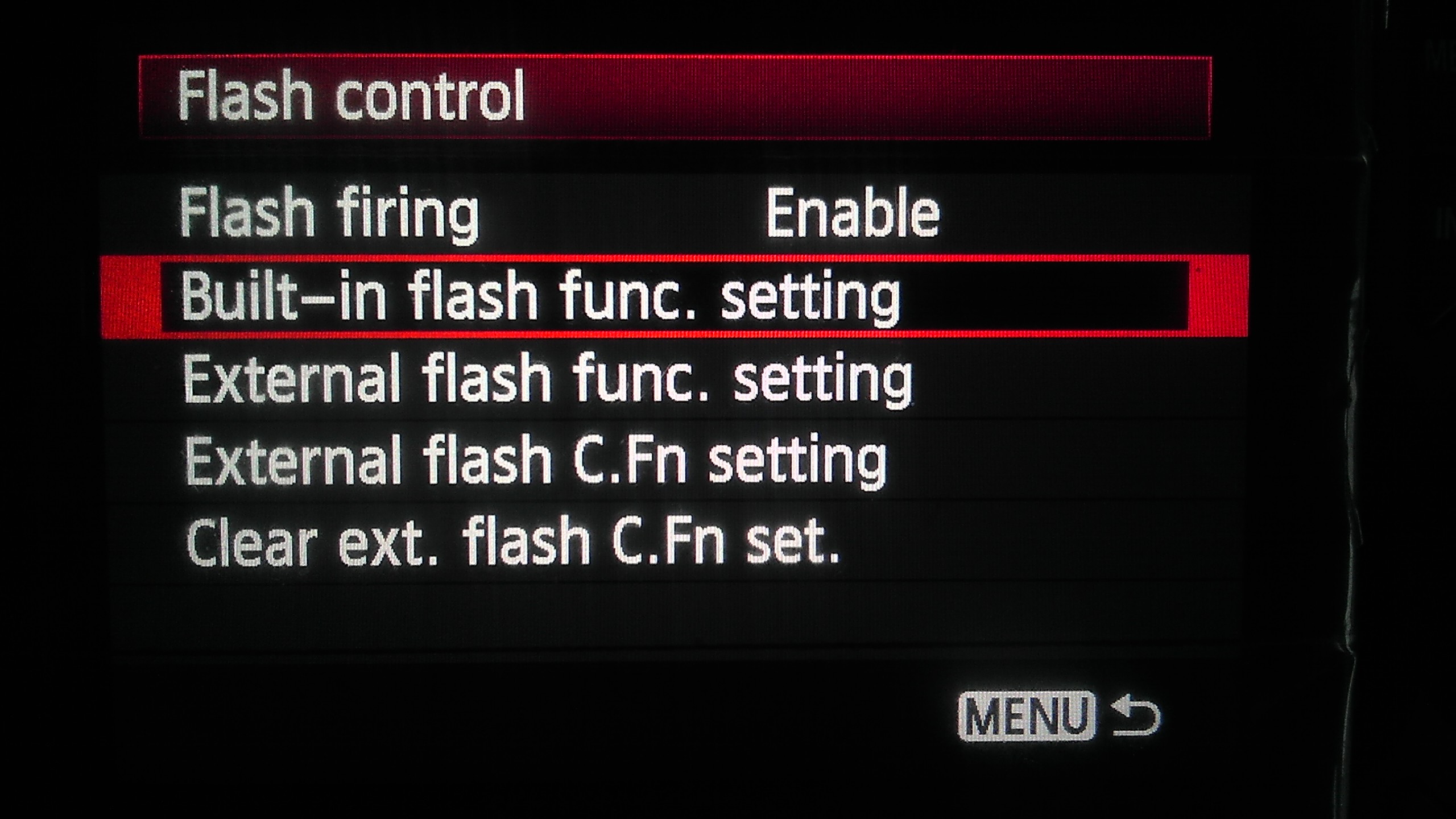
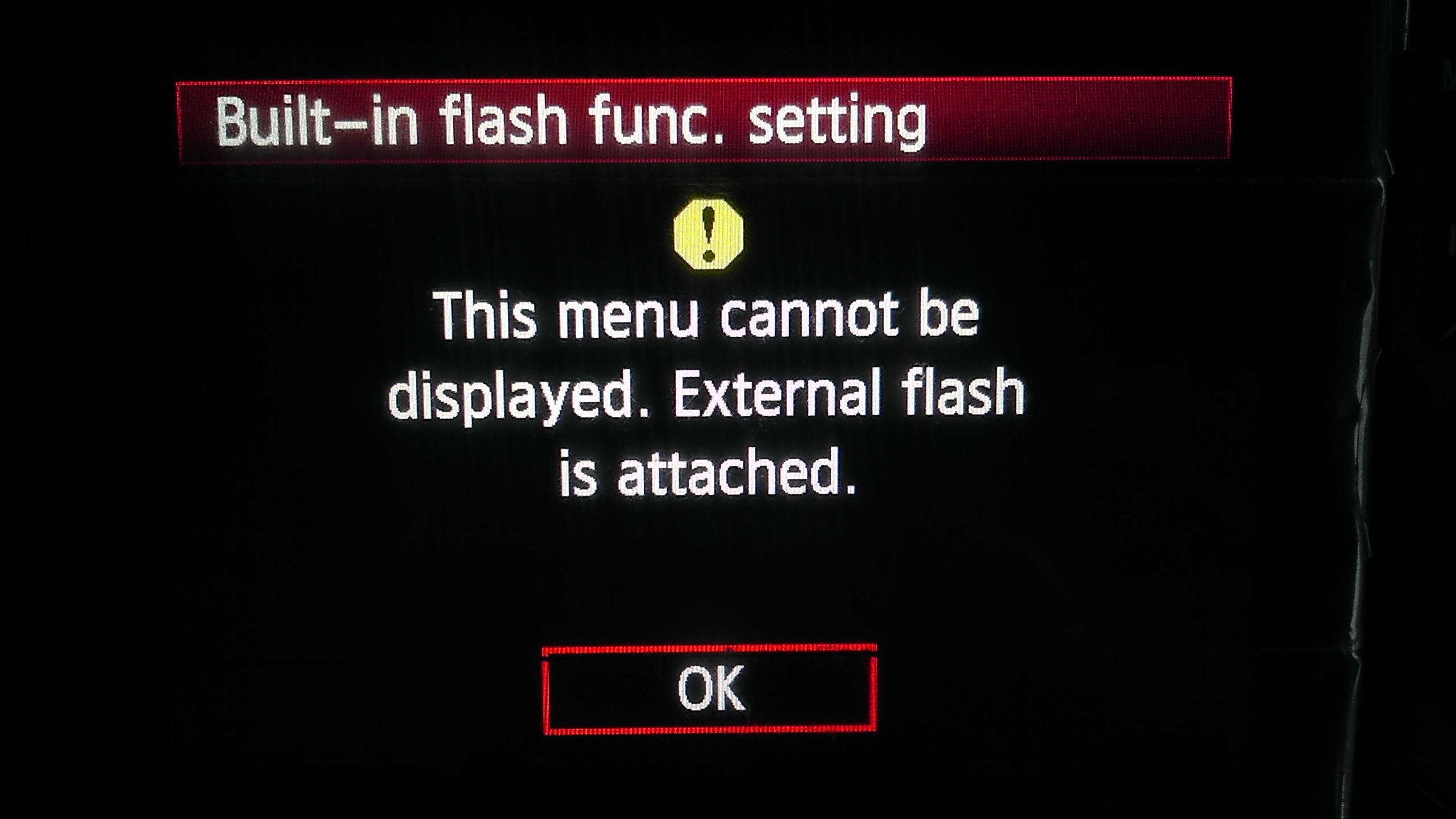
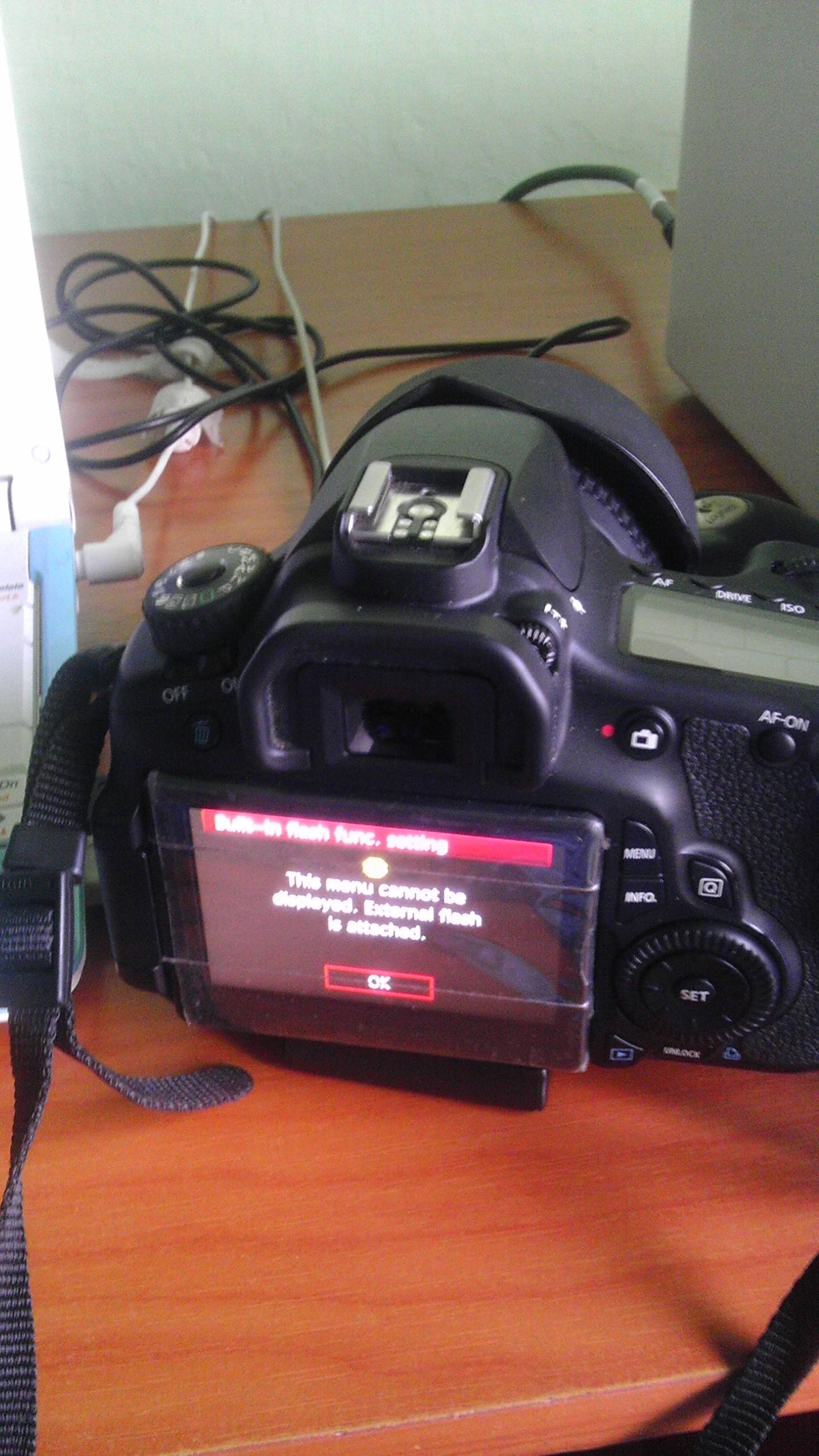
I tried opening the internal flash on my Canon 60D camera the other day and it didn't open at all. I couldn't understand why. After messing around in the menus, I found out that the camera thinks that an external flash is attached. It gives the message "This menu cannot be displayed. External flash is attached."

How do I fix this?

Providing a few photos to explain what happens here. Sorry for the low quality, obviously I couldn't use my 60D to shoot photos of my 60D :))

enter image description here enter image description here enter image description here

Asked by RiMMER

Answer

There is a little microswitch in the hotshoe that detects an external flash -- this may have become stuck, or got a piece of grit blocking it. If you cannot see anything under the rails, you may have to take it to your local friendly Canon authorised repair centre, but if you can see some grit, you may be able to carefully remove it with a cocktail stick or similar.

Answered by Rowland Shaw

Thursday, March 22, 2012

Long exposure on Canon 60D

Question

I want to take some night shots of the sky and landscape showing up stars and cars on a distant road.

I have the option to set the shutter speed to 30s, but I want to take a 2 min (or more) exposure, so capture more movement.

I've seen that you can set it to bulb mode, and hold the shutter down, which isn't practical, as I ned the camera to be completely still.

I could buy a remote, and keep my finger on this I guess, but it still seems a bit fiddly.

Am I missing a trick ? or is the solution to buy a remote?

Thanks Rich.

Asked by Rich S

Answer

You have a couple of options, you could shoot four 30 second frames and then average them in software. This solution doesn't require any extra gear, however it requires you to reopen the shutter quickly for each exposure (which could rock the camera) and introduces the possibility of having gaps in your light trials.

Alternatively, most wired remotes offer the ability to lock the shutter button down so you can let go of the remote until you need to reopen the shutter. Combine this with bulb mode and you can get 2 minute exposures easily without rocking the camera.

Answered by Matt Grum

Monday, March 19, 2012

Canon 60D moire & aliasing issue on videos

Question

Is it a common issue on canon 60d to have moire & aliasing issue when recording videos. Or is it that my sensor or lens has a defect? I'm using the kit lens EF-S 18-135mm IS.

Does anyone here have this issue?

Turning down sharpenss & contrast didn't help.

Asked by Petrick Lim

Answer

Aliasing (and therefore moire, a type of aliasing) is a problem for almost all Canon DLSRs (as well as other manufacturers). The root cause is line skipping, whereby in order to get the necessary framerate only every third line of pixels is read from the chip.

If you have fine detail that is about the same size as a line of pixels then as the camera moves the detail will pop in and out of existence as it passes each active line of pixels.

The latest generation of sensors to be found in the 1DX and 5D mkIII apparently address this issue by reading the whole sensor and downsampling in order to produce the 1080p image.

The issue can be remedied to an extend by mounting an anti-aliasing filter (much stronger than the one in front of the sensor) on the lens. This blurs the image so that the detail will be spread over several lines, and not pop in and out as it crosses an active line of pixels.

Answered by Matt Grum

Sunday, March 4, 2012

Why is my new aftermarket battery grip draining power from batteries?

Question

After reading many reviews I decided to purchase the Zeikos grip but B&H discontinued it so I decided to go with the new Vello grip instead.

I think I might have made a mistake. The grip seems to drain power from my batteries VERY fast. I had the grip on camera with fully charged batteries and they were completely dead in a matter of days just sitting in my bag. I then charged the batteries (genuine Canon) to 100% and turned the camera off. I turned it on every hour or so and took a picture of the battery status menu. In 4 hours the battery power has gone down to 88% with power off and without taking a single picture.

What is going on? Is this thing defective or is there some setting I am missing?

I removed the grip and performed a similar test and the battery power has not gone down at all in 4 hours. The battery normally lasts a very long time so I was quite surprised to loose all the juice in a few days.

Unless there is a setting I can tweak I will return this grip and get a genuine Canon. Do people out there have any similar complaints about the Canon unit?

Asked by Jakub

Answer

I haven't used it, but I know that battery drain with aftermarket grips is a common complaint on photography forums. And people with genuine Canon and Nikon units always reply that they have no such issues.

I would say it's a defect with that particular unit. You could try a 2nd Vello grip and you may find it works well. It shouldn't drain the batteries in a matter of days with everything switched off.

Answered by MikeW

Friday, February 17, 2012

What is the small +- wheel next to my view port for?

Question

I had a scare last night when everything in my view port looked blurry on my brand new Canon 60D, even the digital display a red focus boxes.

The images photos came out clear, the live view was clear, the auto focus was working but everything in the view finder was fuzzy.

I realized spinning/adjusting the small wheel next to the view port fixed this issue.

So my question is, why is this needed at all, what is it for? Is there a way to turn it off? I don't want to accidentally spin it again and make everything fuzzy.

Asked by John Isaacks

Answer

That control adjusts the diopter, an optical adjustment to the viewfinder that allows folks with varying vision abilities to see things clearly. Think of it a bit like reading glasses - it allows for minor vision correction. The idea is that folks who have decent vision but might need minor correction can make an adjustment on the diopter so that as they look through the viewfinder, objects are clear.

As you note, for someone with perfect vision, throwing and adjustment in there can actually make things look worse and cause problems with manual focus.

As it is a manual/mechanical adjustment, I'm not aware of a way to disable the ability to adjust the diopter, although a bit of gaffer's tape over the dial might help avoid inadvertent adjustments.

Answered by ahockley

Wednesday, February 15, 2012

Why does Canon 60D stop recording automatically?

Question

I have read a few posts related to video recording using a DSLR so I decided to try my 60D for the first time. I've had the camera for about a year and a half but never tried recording a video.

Anyway, after a few seconds the video recording stopped and a message was displayed on the LCD screen "Recording was stopped automatically" or something like that.

Does anyone know what the problem here is? Is this SD read-write spead related?

Asked by Jakub

Answer

I have the 60D myself, and haven't experienced this. My first guess would be the write speed of the SD-card. If the card isn't fast enough you can't record video. I can't remember the required speed, but it's in the user manual.

Answered by Håkon K. Olafsen

Saturday, January 21, 2012

Which battery grip should I get for my Canon 60D and why?

Question

I'd like to buy a Canon 60D battery grip not only for the extra battery power but also, and mainly because of the added size and the extra buttons. (I have huge hands)

My question is; How is this $380 grip from our local Canon distributor different from this $50 grip available on amazon. ($320 less)

Is there any reason why I should buy one over the other? Any positive/negative experiences with either unit?

Answer

I own two Canon EOS bodies, a 450D and a 7D. I did quite a bit of research on battery grips for the 450D some time ago, and settles on a Zeikos brand one. I was extremely happy with it. The build quality was superb, the grip rubber was nice and grippy, and very similar to the native grip of the camera body, and it offered all of the features of a Canon brand grip.

I purchased another Zeikos grip for my 7D at the same time I purchased the body. I'm just as happy with the 7D version of the Zeikos grip as I was with the 450D version. I think it may lack one or two of the features of the Canon brand grip, but I don't think they were particularly important to me when I made the decision. All the critical functionality is there, and most importantly, the grip supports two batteries rather than one. Additionally, Zeikos grips always support regular old Duracell, Energizer, Rayovac batteries...AA type for the 450D, 9v for the 7D...and in a pinch, that can be EXTREMEY valuable.

And on top of it all, the Zeikos grips are a small fraction the cost of a Canon brand grip. I would recommend them to anyone who needs a grip and doesn't insist on brand matching. The Zeikos grip for the 60D lists for $90, while the Canon grip for the 60D lists for $270. On Amazon, the Zeikos is currently $61.66, and the Canon is currently $174.88, a difference of almost three times. Functionally, I don't think there is a scrap of functional difference between the two, and the Zeikos is a few ounces lighter.

Thursday, January 19, 2012

How can I make playback zoom start in small steps rather than going to 1:1 with Magic Lantern?

Question

I just got a brand spanking new Canon 60D with the Magic Lantern custom firmware, and I love it except for one thing: when you are looking at the images you have taken, and you press the zoom button, it zooms in as far as possible. I assume this is probably 1:1.

When I press the zoom button, how can I get it to zoom to the least amount? I have looked in the manual and I can't find anything.

Answer

I’ve never experienced this problem with a 60D. The default behaviour (and the only behaviour I could see mentioned in the manual (page 196) is the exact opposite of what you are experiencing. A single press of the magnify button zooms in one step at a time until it reaches maximum zoom.

Some possible things to try:

  • When you’re using liveview mode with manual focus, does the magnify button behave as expected?
  • Is the magnify button a bit sticky (so being held down for too long when pressed)?
  • You could also try resetting all of the camera settings to their defaults, which is available from one of the tools menus (page 51 of the manual). Note, I haven’t done this but it may also reset things like the current file number for pictures so I’d advise doing it with an empty memory card.

How can I make playback zoom start in small steps rather than going to 1:1?

Question

I just got a brand spanking new 60D and I love except one thing: when you are looking at the images you have taken, and you press the zoom button, it zooms in as far as possible. I assume this is probably 1:1.

When I press the zoom button, how can I get it to zoom to the least amount? I have looked in the manual and I can't find anything.

Answer

I’ve never experienced this problem with a 60D. The default behaviour (and the only behaviour I could see mentioned in the manual (page 196) is the exact opposite of what you are experiencing. A single press of the magnify button zooms in one step at a time until it reaches maximum zoom.

Some possible things to try:

  • When you’re using liveview mode with manual focus, does the magnify button behave as expected?
  • Is the magnify button a bit sticky (so being held down for too long when pressed)?
  • You could also try resetting all of the camera settings to their defaults, which is available from one of the tools menus (page 51 of the manual). Note, I haven’t done this but it may also reset things like the current file number for pictures so I’d advise doing it with an empty memory card.

Sunday, December 25, 2011

Why doesn't my Sigma EF-500 flash work properly with my new Canon 60D?

Question

I've recently upgraded to a 60D (from a 300D) and have just tried my Sigma EF-500 DG ST flash. This used to work fine on the 300D but on the 60D when using it in TTL mode the flash defaults to the setting for 105MM, when focusing to take the picture the flash moves through the range down to 28mm and then back up to 105mm which it then sticks on. Trying to take another picture the flash then does the same again. I've got the EFS17-85mm lens fitted to the body.

Any ideas as to what the problem might be? At the moment all the test pictures I've taken are blown out because the flash is too strong. I can revert back to Mh or Ml modes or bounce the flash off a wall or ceiling but I'm confused as to why the flash isn't working when using in the typical configuration like it used to. Does the communication protocol between body and flash change depending upon the model of camera; is my 60D unable to drive the flash?

Given that it's Xmas eve, bit late to ask for another present!

Answer

Contact Sigma. They don't license the flash protocol; they reverse-engineer it. That means that they don't always get the details exactly the same a Canon, and quirks in new models often require an update. The official protocol (secret to Canon) probably hasn't changed, but different camera bodies can implement it differently, and so not work with older reverse-engineering. That's probably what is going on. On the plus side, Sigma will do such updates for free:

Courtesy Updating

In today's day and age of ever-changing technology, Sigma will, at our discretion, offer some updates if available to the original purchaser of the equipment at no charge.  These updates are done as a courtesy and are not considered warranty repairs.  

... but you will have to send it in the their service center, and it may take a little while to get it back.

Wednesday, December 21, 2011

Performance of Sigma 85mm F1.4 EX DGM on Canon 60D

Question

As the Sigma 85mm f/1.4 EX DG HSM was originally designed for Full-frame cameras, how would the performance be affected if I use it on Canon 60D (APS-C camera).

Q1) I need confirmation that this lens can be used on Canon 60D ?

Q2) In the Sigma official statements "When used on digital cameras with an APS-C size image sensor, the lens effectively becomes a 127.5mm F1.4 lens"

Can some kind soul here please explain to me in simple layman terms what does that mean?

ie instead of telling people that i have a 85MM Lens, now, I have a 127.5mm lens - can i tell people that i have a 127.5mm lens?

Q3) Will the perforamance of this lens suffer / be worse off since i am using a APS-C camera instead of a Full Frame Camera in which this lens was designed for?

Q4) Note! If the camera body does not support HSM, autofocus will not be available. Does Canon 60D have this function?

I am sorry that I have asked many questions but I do hope someone can please explain to me.

Answer

I have the Sigma 85mm lens and I am using it on a Canon APS-C sensor camera, the Canon 30D.

Q1 - Does it work? Oh Yeah! I have been so impressed with the performance, I consider it the best lens I own right now.

Q2 - If you put this lens on a "full frame" camera, you get the normal 85mm photo. If you put it on your 60D, you get what appears to be a larger picture. It is a picture that is equivalent to one that you would get if you put a 135mm (there is no 136mm lens which is the actually length) lens on a full frame camera (not your 60D). The way this is figured is to multiply the focal length of the lens times 1.6 (the crop factor). So 85 x 1.6 = 136 (not 127.5 - that length is correct for Nikon APS-C cameras)

Q3 - No suffering will take place.. the photos are simply amazing!

Q4 - The HSM is the same as USM on a Canon lens, and it works just fine on a Canon 60D

Here is a web site that I created because I love this lens so much.. www.sigma85mm.com

Monday, September 26, 2011

Why does my Canon 60D sometimes lengthen exposure when using the flash?

Question

In low light conditions, my first shot will often be handheld with no flash. If there's not enough light however, the shutter speed can be too slow and I'm not steady enough for a crisp image - so I'll pop up the flash.

However, I've found that the camera often decreases the shutter speed (i.e. a longer exposure) even though the flash is firing! I mainly find it when shooting in Aperture Priority mode (with ISO on auto).

Why is this? Surely the additional light from the flash would mean a shorter exposure would suffice?

Answer

There are two reasons why a camera might choose to use a slower speed with flash than without:

  • it tries to fit exposure into sync speed (1/250s on Canon 60D).
  • and/or it chose lower auto ISO thanks to flash usage

Usually, flash is only used to illuminate subject. Your camera still tries to make sure the background will be correctly exposed too.

Tuesday, August 16, 2011

Can I fine tune the autofocus on my Canon 60D to be more accurate?

Question

I noticed that some of my lenses auto-focus more accurately then others. (Assume perfect light conditions and fast shutter speed) Zooming-in on say the center focus point (if only the center focus point has been used) sometimes reveals that the lens overshoot or undershoot the focus just ever so slightly. I also almost always get a better and sharper image when focusing manually (and breathing correctly). I mean the autofocus is not bad (seems best on my prime 50mm lens, less perfect on my 70-200mm telephoto) but not perfect.

I might now be thinking this up as I write along but If I remember correctly I've read somewhere that the Canon 50D body has some kind of an feature that can fine tune the AF for differently for different lenses.

In the end I decided to go with the Canon 60D body. My question is: Is it possible to somehow calibrate the auto-focus with my body to perform more accurately?

Answer

You adjust focus on the camera - not the lens. The Canon 60D does not have a micro focus adjustment needed to do this.

You may try sending in your camera and lenses in for adjustment together, but it is not something you can adjust yourself on that body.

If your 70-200 is significantly slower in max aperture than your 50mm, then it likely doesn't autofocus as well because of the slower aperture. More light = better autofocus.

Friday, August 12, 2011

Can the Tokina AT-X 165 PRO DX AF 16-50mm f/2.8 actually be found new, and how does it compare to the Canon EF-S 17-55mm f/2.8 IS USM?

Question

I am having difficulties finding in-depth (Canon mount) reviews and comparisons for the Tokina AT-X 165 PRO DX AF 16-50mm f/2.8 lens. This lens is currently not sold on Adorama and B&H says that is has been discontinued by the manufacturer. In fact many other sites state it is currently unavailable. However, on the Tokina site it is called a "new" lens. I am confused.

In any case, suppose I could get this lens somewhere for roughly $550 - $600 USD, how does it compare with the $1100 - $1200 Canon EF-S 17-55mm f/2.8 IS USM? Does anyone have hands on experience with this lens?

Also, does anyone know of any reputable place that actually offers this lens?

Answer

Lenstip has quite a complete review of the lens, they compare the canon to the nikon mount, even with some history: they mention how it was postponed after tokina realized how good the tamron was.

Tokina lenses can be hard to find, resellers only have the most recent ones available. Maybe you can find one in the second-hand market, that's how I found my Tokina 50-135 Canon mount not so long ago: clean, never unpacked, with a small premium.

In Japan though they seem to be well distributed, maybe you can find a shop there that will ship it to you.

Wednesday, August 3, 2011

Why does my new Canon EOS 60D appear to have 3880 photos taken already?

Question

I just bought a new Canon EOS 60D and a new 8GB SDHC card. When I started it the first time I realised that the shutter count on Battery-Information-Menu was at 256 taken photos.

I made a few shots an copied them on my pc. Then I realised that my first pic had the name IMG_3881.JPG

How are theses counters set?

The SD card was in its original package but I didn't have to format it. Is it possible that the camera was already in use?

Answer

Using the filename to get shutter count might be inaccurate because of previously stored photos. You can try using utilities like http://www.mydigitallife.info/2010/10/20/download-eosinfo-to-check-shutter-count-for-canon-dslr/ to get the real shutter count

Wednesday, July 27, 2011

Which camera has the best features for still photography: Canon 60D, 50D or 7D?

Question

Now that the 60D specs are released.

When choosing a camera for still photography (no movies) which one of Canon 50D, 60D and 7D has an edge over the others and why?

What still photography features does each camera, respectively, have that the others don't?

Answer

There is a very good feature comparison on dpReview site

To give you some summary:

In terms of picture quality I would say that you would not spot a difference between results achieved from all the camera on the list, and I would say that the choice would be more related to handling and the way you are planning to use the camera.

7D is pro grade body, with magnesium body and environmental sealing. It has an excellent pro grade autofocus and offers 100% view viewfinder. So it will have an edge when it come to shooting sports, birds and in rough conditions. Those features come at price though.

50D has pretty similar body to 7D (magnesium) but it is not that well sealed and the autofocus is a bit lower quality as well.

60D has plastic body, same autofocus as 50D and similar sensor to 7D. It offers swivel LCD which can come handy in some situation, and its lower weight and size can be considered an advantage by some (me included).

So you need to handle the cameras, consider your budget a see which one works best for you.

Thursday, July 21, 2011

How weather-resistant is the Canon EOS 600D?

Question

I have many friends with Nikon D300s and Canon 7Ds and they say they can handle pretty much anything they throw at them. I know the 600D is way less fit for this but I just would like to know, out of curiosity, what conditions that it could maybe withstand. I am only interested in how much the body can take, because I know that the total weather resistance depends a lot on the lens (let's assume I have a EF-L tele lens attached).

Also possibly, how does it compare to the 60D in terms of weather resistance?

Thanks in advance
Fred

Answer

It's basically, not (weather resistant). I don't believe any Canon Rebel series is weather sealed or resistant to any appreciable degree more than it looks.

It may survive a light spray of water or a little beach sand depending on where it goes, how much, and how long, but its simply not sealed against such things. If you're going to be shooting in any harsh conditions consider something to protect your camera (trashbags or the like) or a sealed camera + lens.

There's a lot of conflicting information on the net about the 60d sealing, but I don't think it is. The official Canon website doesn't state it anywhere in their specs or features.

Sunday, July 17, 2011

Which piece of equipment is holding me back?

Question

I am primarily an amateur photographer but I do take small jobs from time to time. I'm looking to upgrade my equipment but I'm not sure if I should be spending money on my body, glass, or both. I have two common issues that I'd like to improve.

  • I shoot a lot at ice rinks and find that even in servo mode I get a lot of shots that are slightly out of focus. I try to keep the AF target on face masks but many shots will come out focused an inch or two off (ears, hands, etc). I'm shooting F/1.8-F/2.8 to get action stopping shutter speeds so you can really tell when the focus is even a hair off. I don't know if this is a limitation of my camera, lens, or the human operator.

  • Most of my paid work is indoors shooting candids where a flash is inappropriate. I feel like I need to use a higher F-number to get more subject in focus but I usually can't do it without upping to ISO 3200 unless I'm using a flash. By the time I clean up the high ISO noise in Camera Raw I end up with an image lacking detail. So far this hasn't been a big problem because the photos are typically used in magazine prints only an inch or two wide but it's still driving me nuts.

Here is the equipment currently in my bag:

  • Canon Rebel T2i
  • Canon EF-S 18-55mm f/3.5-5.6 II (no IS)
    • Collecting dust, came with my old Rebel XTi.
  • Canon EF-S 18-135mm f/3.5-5.6 IS
    • Purchased with my T2i. This is my workhorse lens but I'm disappointed with the soft images it produces at higher focal lengths. Stopping down makes the images acceptable but that's not always an option. My eyes want more contrast and color but considering how inexpensive this lens is I can't really complain.
  • Canon EF 70-300mm f/4-5.6 IS USM
    • This was purchased with an older camera and doesn't get used much anymore. The images are too soft beyond 200mm and the AF seems sluggish.
  • Canon EF 50mm f/1.4 USM
    • I am extremely happy with the images I get from this lens. I use it indoors all the time and also paired with extension tubes for some macro work. Some of my best ice hockey images have been from this lens even though I didn't have sports in mind for this lens.

My initial plan was to upgrade to a 60D or 7D body but after doing some reading it occurred to me that I might invest in better glass first. I'm unsure of what will help improve focusing, image quality, high ISO shooting, etc. Maybe it's a new camera, new glass, photography lessons, or a little of everything?

I'm looking to keep my next round of purchases under $3,000 and am willing to trade in some of my used equipment to offset costs. Would anyone care to make a recommendation? I'm looking at the EOS 60D and 7D bodies. Not sure if the 7D is overkill for my needs. I'm also looking at the EF 24-70mm f/2.8L USM lens to be my new workhorse but I'm concerned that it may not be wide enough on an APS-C body and the lack of IS might be an issue. There's also the EF 70-200mm f/2.8L IS II USM but I'm thinking it wouldn't be wise to spend all my budget on that lens right now (or maybe not?).

Thanks!

Thanks so much everyone for all of the insight. I think the first thing I'm going to do is look at the 7D body and EF-S 17-55mm f/2.8 IS USM lens. If that lens is a step up from my 18-135 then that should keep me happy for a while. If the lens doesn't meet my expectations I think an EF 24-70mm f/2.8L USM might be a good alternative. Either way I can keep things under budget. I was trying to not buy another EF-S lens but I have to keep reminding myself that I'm not a professional!

Amateur hockey season won't start back up for a while so after this purchase I will sell off a few items and save up for the EF 70-200mm f/2.8L IS II USM. Based on the reviews this thing looks like the real deal and even though it's a bit pricey it should service me well for at least a decade even if I should move to a FF body. I may also go with a 100mm or 135mm prime at a fraction of the cost. I already shoot at the rink without a zoom lens, why start now, right??? Saving the $2500 will probably make the wife happier too. :)

What I Ended Up Doing

I ended up buying a Canon 7D and a 24-70mm f/2.8L lens. A huge upgrade indeed and I'm very happy with my purchase. I plan to invest in a 70-200mm f/2.8L IS II in a couple years to complete my range of needs. I now have a mint condition T2i to sell. :) Thanks again everyone!

Answer

I would gravitate to lens choices over the body. There's a couple of reasons...

  1. The lenses will be useful in the future when another opportunity to purchase arises.

  2. Fast glass, such as f/2.8 zooms, are very helpful in low light. These are, often, pro grade lenses as well, so that helps sharpness.

In the end result, you'll have these lenses for years, the bodies will come and go. So, that investment will pay long term dividends starting now. The other thing to keep in mind, cameras like the 7D will start to appear on the used market and so you may find you'll have budget when that happens and you'll have nice lenses for it when it does.

Now, having said that, the big upside to a 7D now is the speed of the camera. The frame rate is high and that helps a lot in the situations you shoot in. A common technique in these environments is to shoot a bunch of frames of the same scene, it ups the odds that one is sharp.

Still, I'd go lenses first if you have a cap on spending.