Showing posts with label multiple-exposure. Show all posts

Monday, May 7, 2012

Is it possible to manually controll the flash while using the BULB manual exposure setting on a Canon XSi?

Question

To explain a little more, I want to be able manually set off the flash more than once for the purpose of having a double exposure while shooting in manual exposure mode. Is there a way to do this using the Canon XSi that doesn't involve any extra equipment and only the on-camera flash?

Asked by Dylansq

Answer

Since you're looking to do this with the built-in flash, the answer is a simple "no, sorry". Some other Canon models can use custom firmware which might be able to enable what you want, but not this one.

I would suggest getting a very cheap manual flash which you can trigger by hand, if timing isn't vital. Or, at a higher cost, many non-manual hot-shoe flashes (both from Canon and third-party) have a stroboscopic mode, which does exactly what you want automatically.

Answered by mattdm

Wednesday, April 11, 2012

Can I combine several low quality pics into one higher quality picture?

Question

Is there an easy tool to combine low quality pics taken from a mobile phone, all of the same thing but taken within a few seconds interval from one another, mostly suffering from slight out of focus issues? How can I combine them into higher quality?

EDIT: Apparently the concept is stacking: "focus stacking is taking several images of the same object(s) which are partially in focus and combining them in such a way as to keep the sharp parts and get rid of the blurry ones"

Answer

I found a piece of software in Linux that does stacking of images: ale

ale IMAG0626.jpg IMAG0627.jpg IMAG0628.jpg output.jpg
Output file will be 'output.jpg'.                                                                                                                                        
Original Frame:                                                                                                                                                          
 'IMAG0626.jpg'.                                                                                                                                                         
Supplemental Frames:                                                                                                                                                     
 'IMAG0627.jpg'*** okay (92.930228% match).                                                                                                                              
 'IMAG0628.jpg'*** okay (94.896616% match).                                                                                                                              
Re-filtering incremental results.                                                                                                                                        
Iterating Irani-Peleg.                                                                                                                                                   
Average match: 93.913422%                                                                       
Answered by 130490868091234

Wednesday, February 22, 2012

How can multiple exposure be achieved with a digital camera?

Question

When using a film camera, it’s possible to create photographs that are the result of multiple exposures, by not winding the film on before taking the next shot. Is there a way of achieving the same result with a digital camera?

I’d like to be able to take multiple incremental shots and then either have them automatically combined in camera, or in post processing.

I know I can create a similar effect by using a long exposure, like the one below (shot with 10 second exposure), but this is quite limiting in what can be achieved and makes composition quite difficult.

enter image description here

Asked by forsvarir

Answer

Note that this is called multiple exposures, not incremental.

A good number of digital cameras of all sizes do this: Most Pentax DSLRs (K-5, K-7, K20D, K10D, K-r, K-x), the Pentax Q, all third generation Olympus ILCs (E-P3, E-PL3, E-PM1) plus the OM-D E-5, most mid-to-high end Nikon DSLRs (D300S, D700, D3X, D3S), the Canon 1D X, a number of Fuji ultra-zooms (like the S9000) and the Olympus ZX-1 which is the smallest camera to have this feature.

Honestly, doing this in software is extremely easy and much more flexible by using Photoshop layers (or equivalent) with various blending operators. The only time one would do it in camera is if you absolutely need to get the alignment blending exactly a certain way. This will be tedious on any camera which is not a Fuji because they are the only ones which let you undo the previous step in case it does not appear as desired.

Answered by Itai

Wednesday, September 21, 2011

Can exposure be bracketed by many sensor readouts during single exposure?

Question

I am getting into some HDR photography and was thinking of a new ways that camera manufactures could help us in capturing HDR pictures.
Say you want to capture three image and you have a constant Aperture and ISO with shutter speeds of 1/2, 1 and 2 seconds (for -1, 0 and +1 exposure compensation).
You set the shutter speed to 2 seconds and press the shutter release button.
1/2 seconds later, the camera takes a readout from its sensor and saves the output to a file.
Another 1/2 second later (for 1 second exposure) it takes another readout and saves the data.
1 second after that (for the 2 second exposure) it takes another readout of the sensor and saves the data.

So for a single shutter count, we get 3 images at different points in time.

I am not sure if any cameras does that but is it technically possible to do it?

Answer

This is not really my area, but I believe that readout is achieved by discharging the charge that builds up at each photosite due to arrival of photons. This would mean sampling pixels during the time the shutter is open would be equivalent to taking a series of separate exposures using an electronic shutter.

Now in this scheme you could then average several images in the shadow areas to reduce noise and hence increase dynamic range. But that wouldn't really be much different to shooting a series of images using a traditional HDR approach, plus you'd have to deal with rolling shutter issues on CMOS chips.

It's a good idea, I'm just not sure it's possible. The best you could hope for would be to have a rough way of detecting when a photosite was going to saturate. You could then sample the photosite at that point, and multiply the value post digitization by the proportion of exposure time it had. That would prevent overexposure, increasing the amount of light the sensor could handle before saturation hence increasing dynamic range. However, CMOS chips read line by line, so I imagine it would be very hard to read individual pixels ahead of time.

You'd also get some weird effects with moving subjects with this scheme, or indeed any time based HDR approach. The best idea in my opinion was Fuji's superCCD R which had an extra set of low sensitivity pixels (giving two readings in each location). This effectively allowed two different exposures to be recorded at the same time.

Wednesday, August 31, 2011

How can I simulate a long exposure photo using a set of shorter exposure photos?

Question

I'm shooting towards the sky to capture the stars. The exposure time is 15 seconds, so I can see the stars still, without a trace. These photos are taken continuously one after the other, because I want to make a time-lapse video showing the "movement" of the sky (it is the earth that moves actually).

For that, everything's fine. But I'd also like to do one other thing. If instead of taking all those photos, I would take just one with a exposure time that equals the sums of all those photos photos together (15 sec times the quantity of photos), I would see the trace the stars left in the sky.

Is there anyway to "create" that photo, from all the "short" exposition ones?

Answer

You can do it with a script for The GIMP. I did it a couple years ago, and got pretty good results. Remember to keep the time between exposures as short as possible, otherwise you will get visible gaps in the trails. That's why it's best to take a single dark frame at the end, and subtract that frame from the result (I had intended to incorporate that into the script, but never got around to it).

My notes for the script:

Combined with renaming the first to base.JPG, "gimp -b -" with
(let* ((filelist (cadr (file-glob "IMG*.JPG" 1)))
      (img (car (gimp-file-load RUN-NONINTERACTIVE "base.JPG" "base.JPG"))))
  (while (not (null? filelist))
    (let* ((filename (car filelist))  (layer (car (gimp-file-load-layer RUN-NONINTERACTIVE img filename)))
  )
      (gimp-image-add-layer img layer 0)
      (gimp-layer-set-mode layer LIGHTEN-ONLY-MODE)
      (gimp-image-merge-visible-layers img CLIP-TO-IMAGE)
      )
    (set! filelist (cdr filelist))
    )
  (gimp-file-save RUN-NONINTERACTIVE img (car (gimp-image-flatten img)) "test2.jpg" "test2.jpg")
)

For subtracting the dark frame, my notes say, "I opened this as a layer on the composite image (the result of my gimp script), and set the dark layer's mode to Difference."

Thursday, August 25, 2011

How can I overlay many frames from a video into a single merged image?

Question

I am looking for a simple way to turn a video into one image. I want each frame to be added to together to create one (over exposed) image. The point of this is I am trying to convert a video of me using a light to write in the air into a picture of 'Light Graffiti'. At the moment I can export each frame into a folder called 1.jpg, 2.jpg, 3.jpg ect. But I need a way to merge (Adding) these images literally on top of each other.

I don't have Photoshop but I can use Paint.net or Gimp.

What is the easiest way to batch merge a folder of images using add or is there an easier way to do this?

Answer

You could use ImageMagick to merge the images:

convert -compose lighten 1.jpg 2.jpg -composite 3.jpg -composite 4.jpg ... -composite result.jpg

Sunday, July 17, 2011

Can one create multiple exposure images with a Canon DSLR?

Question

In looking at the user manual for a Nikon D7000, I see that the camera can create multiple exposure images (where more than one image is exposed into the same frame) in-camera. I don't recall ever hearing that was possible with my previous DSLRs (which have all been Canon).

Do any Canon DSLRs offer the ability to do multiple exposures?

Answer

Short answer: no. Longer answer: You can fake it, to a degree, with long exposures.

In a nutshell, what you want to do start your exposure, expose the first part, then cover the lens with a dark cloth, reposition, and remove it to expose again.

It’s not as precise, it’s more work, it works better at night, and it might not be worth it. That said, you can get some neat effects with the technique: Example (via dreamsjung)

How do I combine multiple exposures for action shots?

Question

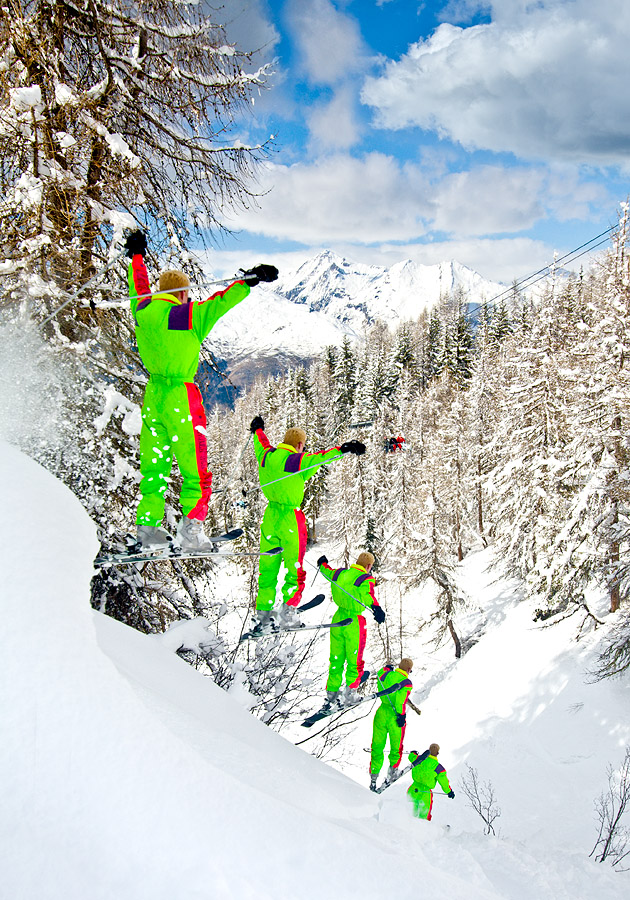
I'd like to create one of those "stacked" action shot images where multiple exposures are combined to show the subject moving across a static background. Here's an example I found on Flickr (by Laurence Asuncion): http://www.flickr.com/photos/dfunkpinoy/2755832144/

Ideally, I'd like tips both for the photography part of this and for post-processing. For example, I'd imagine I want to shoot manual w/ the same exposure for all shots (as with a panorama), but I'm not sure if there are any other helpful tips for taking the shots. At one point, for example, I thought I'd have to tripod-mount the camera and keep the same framing for all shots, but I've now seen several examples where the composition moved from shot-to-shot.

I'm also interested in recommendations for post-processing -- software, technique, etc. I can envision a manual process where I stack layers and align them by hand in Photoshop Express, but I'd be surprised if there wasn't a better way — maybe using a pano tool like Hugin.

Answer

Everything that applies to shooting a panorama applies to shooting one of these. A tripod makes assembling more convenient but means you can't pan to follow the action. It's important to rotate the camera and not move your feet in order to make sure the shots line up. Locking the focus is going to be necessary. Same with shutter/aperture.

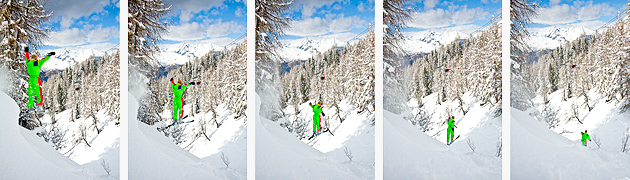
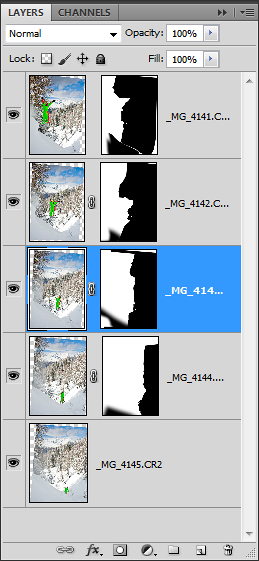
I've only done one of these, it could have been shot on a tripod but the location didn't allow it! I loaded the images in Photoshop, auto-aligned and then manually masked the overlap areas, this was quite easy as the frames are just the right distance apart to minimise overlap. A bit of overlap adds to the effect, too much can make it hard to see what going on.

Here are the original shots:

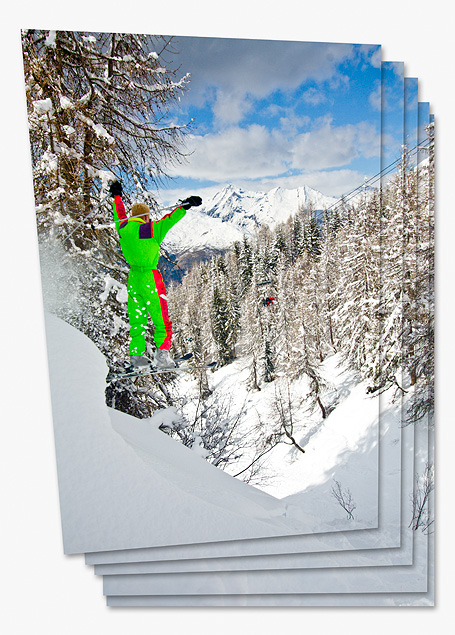
Photoshop's built in panorama tool has no trouble aligning the images:

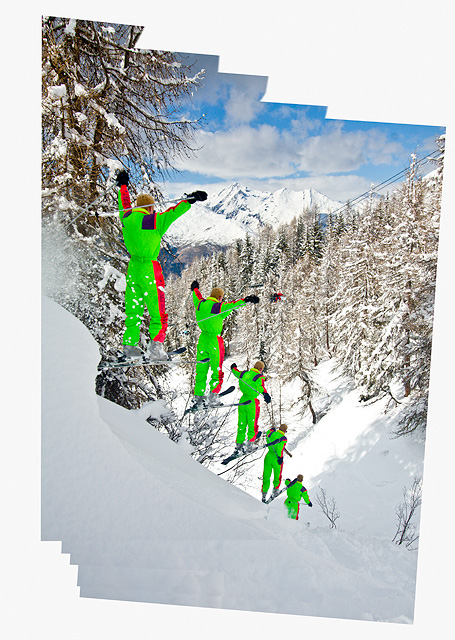
A drop shadow has been added to show where the edges are. As you can see there was a little panning. I did not shoot the images but I did the post production (and modelling :) the actual photos were taken by a friend of mine. Here are the images blended together:

Here are the masks used:

I did a bit more blending, rotated the image, and filled in some missing sky/foreground and adjusted the contrast slightly, here is the final image:

The camera settings were 1/800s f/8.0 ISO200 22mm

I would be possible to automate the process of overlapping the subject by subtracting the common background areas and layering up the frames in chronological order.

Friday, July 15, 2011

How to achieve shallower DOF using multiple exposures?

Question

For static or semi-static scenes, there are many ways to "simulate" certain features actually not feasible on single photo using the technology the photographer has. For example,

  • wider field of view by taking multiple shots in adjacent directions and stitching them into a panorama;
  • deeper DOF by focus stacking;
  • lower ISO by averaging multiple frames;
  • higher dynamic range by merging differently exposed frames into a HDR image.

This makes me wonder, is there any way to use multiple exposures for creating shallower DOF at a given field of view, normally achievable with a faster lens or a bigger sensor. How to do that?

I know it's kind of stupid to start out with a hammer and then invent how to carry water with it... but I stil wonder.

Answer

Yes indeed, in fact your first bullet point does that. By stitching a panorama you are simulating a larger sensor.

The effect works best when you use a telephoto lens and create a multi-row panorama with approximately the same aspect ratio as a regular photograph. This is sometimes referred to as the Brenizer method (after the person who popularised the technique) or a "Bokeh Panorama".

To convince yourself this works, thing of the last time you saw a telephoto shot (say 200mm) with a sharp background? Never (unless the BG was within the DOF, unlikely unless you shoot 1/128). By stitching several telephoto shots together you get the field of view of a wide lens, but a blurred background in every shot, hey presto shallow depth of field! Stan gives a very good more detailed description of the technique in the answer to this question:

What is Bokeh panorama (AKA Brenizer method)?

The opposite also works, if you want to simulate the deep depth of field of a small sensor camera use a very wide angle lens (like a 10mm) and crop a tiny bit out from the centre of the frame and you'll get the equivalent of a slight telephoto on a crop body (albeit at a much lower resolution).

Tuesday, July 12, 2011

HDR/ADL/Multiple exposure/Auto bracketing(AE,WB,ADL) - I got confused

Question

What are the main differences between these:

They look pretty similar (not "the same"), aren't they?

Answer

There are indeed differences, and the purpose of each is not necessarily the same either. Of the four, three do aim to improve your dynamic range in one way or another, however Multiple Exposures has other uses.

To start with HDR, this is more of a post-process blending technique that merges multiple photos of the same scene to improve total dynamic range. It is most useful when the scene you are trying to photograph has considerably greater dynamic range than the camera is capable of capturing in a single shot. Usually only three shots, one normally exposed, one under exposed by a stop or two, and one over exposed by a stop or two...are required to blend an HDR scene with a tool like Photoshop or PhotoMatix. Ultimately, the final step in HDR processing is to convert a 32-bit floating point HDR image into a normal 16-bit or 8-bit LDR (low dynamic range) image. Currently, there is no known device capable of actually showing the full dynamic range possible with an HDR image, and one must selectively tone map the image to produce a meaningful LDR result. HDR simply gives you maximum control over which tones you keep, which you discard, and which get "compressed" into the lower dynamic range of a normal image.

ADL, or in the case of Canon cameras HTP (Highlight Tone Priority) is a mode of camera operation that automatically tries to preserve as much highlight dynamic range as possible. This usually results in under-exposure in one way or another. If highlights are your primary concern, this mode can help ensure that you don't fully blow out your highlights such that they are unrecoverable. Unlike film, digital sensors have a hard limit on their sensitivity, and once that limit is reached, no further detail can be captured, and any additional exposure will simply bleed out detail information that you have captured. The consequence of using automatic camera modes that try to preserve highlight tones is that you might end up with underexposed shadow tones. This may or may not be an issue in the general sense...if highlights are what your after in your shot.

Automatic Bracketing is a feature of many modern digital cameras that aims to automatically adjust exposure for bracketing shots. As mentioned before, bracketing is usually a necessary starting point for HDR processing. Multiple shots, usually three, are necessary to blend an HDR image. Auto exposure bracketing allows you to set how many stops you wish to bracket, up to the standard metering range your camera is capable of (usually -2 to +2 EV). When you actually take a shot, you press the shutter three times in a row to capture normal, under-, and over-exposed shots.

Multiple Exposure photography is a bit more versatile. It is most effective with film, although there are techniques that you can use to achieve a similar effect with digital...its just more post-processing work. The general idea with multiple exposures is that you don't advance the frame...one exposure is taken on the same frame of film as the previous. In the case of a lunar eclipse, this will continually increase the exposure of the sky while also capturing the moon in multiple locations over the total duration of all exposures. The effect is a compound of both a elongated night sky photo, as well as the composite of numerous individual shots of the moon as it progresses through its eclipse. One need not expose the same scene with multiple exposures, however. Exposing multiple scenes with a single film frame can produce a variety of interesting effects, only really limited by your imagination.